Software:

Featured: NoClone
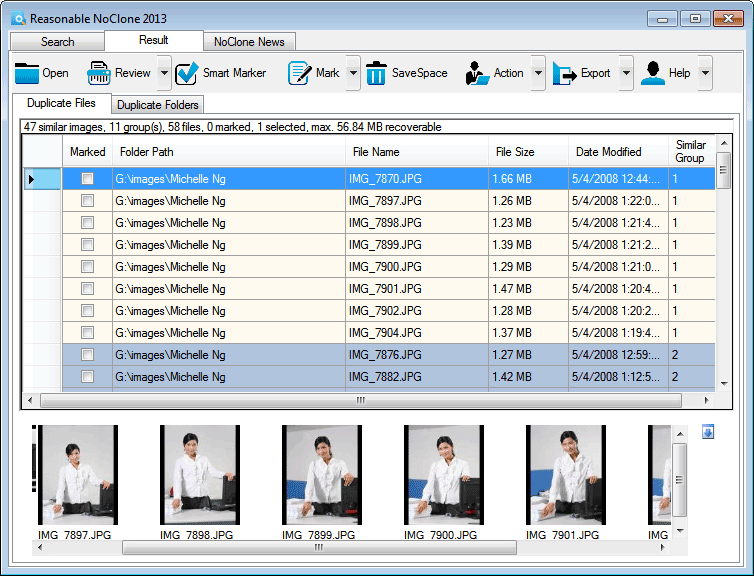
NoClone NoClone - Find and Remove TRUE duplicate files.
Byte-to-byte comparison. Smart deletion. Clean up hard drive. More info - Download - Get it now!
|
|
Featured: AttributeMagic Pro
AttributeMagic Pro Changes file/folder date-time and attributes en masse. You can set/reset attributes, Accessed, Modified, Created dates, JPEG/EXIF metadata, MS Office document properties, NTFS streams. Date-time shifting, masking, assignment, directory printing. More info - Download - Get it now!
|
|
Soft14:
| |  | Powerful and flexible hard disk space manager. TreeSize Professional shows the size, allocated and wasted space, 3D charts, last access date, file owner, NTFS compression rate and more. Results can be printed or exported. Search for obsolete files. See also: TreeSize tool, Professional tool, Windows tool, TreeSize tool, hard disk tool, hard tool, disk tool, usage tool, monitor tool, ...
[ Download TreeSize Professional - Get TreeSize Professional now - More info about TreeSize Professional ] |
| |  | Multi-purpose search and replace tool with full Unicode support, Text Workbench will increase your productivity and save many hours of manual editing that you spend daily for updating all your files of any type either at your local disks or via FTP. See also: search tool, find tool, replace tool, text tool, unicode tool, utf 8 tool, html tool, editor tool, tool tool, ...
[ Download Text Workbench - Get Text Workbench now - More info about Text Workbench ] |
|
Suggested software:

EasyWebEditorA professional and easy to use software for creating your own Web site.
|
|
| |  | Launch Softick Blue Files, and your memory card will be accessible over Bluetooth wireless link! You will be able to manage files at your Palm Powered device from any desktop PC, using Bluetooth software shipped with your Bluetooth adapter or operati See also: Bluetooth FTP tool, Bluetooth File Exchange tool, Bluetooth OBEX File Transfer tool, palm tool, palm os tool, palm Bluetooth tool, PalmOs tool, memory card tool, storage card tool, ...
[ Download Softick Blue Files - Get Softick Blue Files now - More info about Softick Blue Files ] |
| |  | |
| |  | For fast and powerful search and deleting of unnecessary duplicates, use Shuric Scan. Freespace without deleting your valuable information. Works faster than other similarprograms. See also: dups tool, duplicate tool, file tool, search tool, look tool, scan tool, space tool, free tool, clone tool, ...
[ Download Shuric scan(clone and duplicate killer) - Get Shuric scan(clone and duplicate killer) now - More info about Shuric scan(clone and duplicate killer) ] |
| |  | Select Folder Express helps you instantly jump to your frequently used folders in the Windows Explorer, in standard Open/Save as/Browse dialogs,the desktop and the Start Button.It can runs automatically as part of your context menu in them. See also: select folder tool, folder express tool, access folder tool, jump folder tool, favorite folder tool, browse folder tool, change folder tool, explore folder tool, open folder tool, ...
[ Download Select Folder Express - Get Select Folder Express now - More info about Select Folder Express ] |
See also the other sections: Utilities, Hardware File, Disk Management section 1, Utilities, Hardware File, Disk Management section 2, Utilities, Hardware File, Disk Management section 3, Utilities, Hardware File, Disk Management section 4, Utilities, Hardware File, Disk Management section 5, Utilities, Hardware File, Disk Management section 6, Utilities, Hardware File, Disk Management section 7, Utilities, Hardware File, Disk Management section 8, Utilities, Hardware File, Disk Management section 9, Utilities, Hardware File, Disk Management section 10, Utilities, Hardware File, Disk Management section 11, Utilities, Hardware File, Disk Management section 12, Utilities, Hardware File, Disk Management section 13, Utilities, Hardware File, Disk Management section 14, Utilities, Hardware File, Disk Management section 15, Utilities, Hardware File, Disk Management section 16, Utilities, Hardware File, Disk Management section 17, Utilities, Hardware File, Disk Management section 18, Utilities, Hardware File, Disk Management section 19, Utilities, Hardware File, Disk Management section 20, Utilities, Hardware File, Disk Management section 21, Utilities, Hardware File, Disk Management section 22, Utilities, Hardware File, Disk Management section 23, Utilities, Hardware File, Disk Management section 24, Utilities, Hardware File, Disk Management section 25, Utilities, Hardware File, Disk Management section 26, Utilities, Hardware File, Disk Management section 27, Utilities, Hardware File, Disk Management section 28, Utilities, Hardware File, Disk Management section 29, Utilities, Hardware File, Disk Management section 30, Utilities, Hardware File, Disk Management section 31, Utilities, Hardware File, Disk Management section 32, Utilities, Hardware File, Disk Management section 33, Utilities, Hardware File, Disk Management section 34, Utilities, Hardware File, Disk Management section 35, Utilities, Hardware File, Disk Management section 36, Utilities, Hardware File, Disk Management section 37, Utilities, Hardware File, Disk Management section 38, Utilities, Hardware File, Disk Management section 39, Utilities, Hardware File, Disk Management section 40, Utilities, Hardware File, Disk Management section 41, Utilities, Hardware File, Disk Management section 42, Utilities, Hardware File, Disk Management section 43, Utilities, Hardware File, Disk Management section 44, Utilities, Hardware File, Disk Management section 45, Utilities, Hardware File, Disk Management section 46, Utilities, Hardware File, Disk Management section 47, Utilities, Hardware File, Disk Management section 48, Utilities, Hardware File, Disk Management section 49, Utilities, Hardware File, Disk Management section 50, Utilities, Hardware File, Disk Management section 51, Utilities, Hardware File, Disk Management section 52, Utilities, Hardware File, Disk Management section 53, Utilities, Hardware File, Disk Management section 54, Utilities, Hardware File, Disk Management section 55, Utilities, Hardware File, Disk Management section 56, Utilities, Hardware File, Disk Management section 57, Utilities, Hardware File, Disk Management section 58, Utilities, Hardware File, Disk Management section 59, Utilities, Hardware File, Disk Management section 60, Utilities, Hardware File, Disk Management section 61, Utilities, Hardware File, Disk Management section 62, Utilities, Hardware File, Disk Management section 63, Utilities, Hardware File, Disk Management section 64, Utilities, Hardware File, Disk Management section 65, Utilities, Hardware File, Disk Management section 66, Utilities, Hardware File, Disk Management section 67, Utilities, Hardware File, Disk Management section 68, Utilities, Hardware File, Disk Management section 69
|
|
Categories
|
|
|
|