Software:

Featured: NoClone
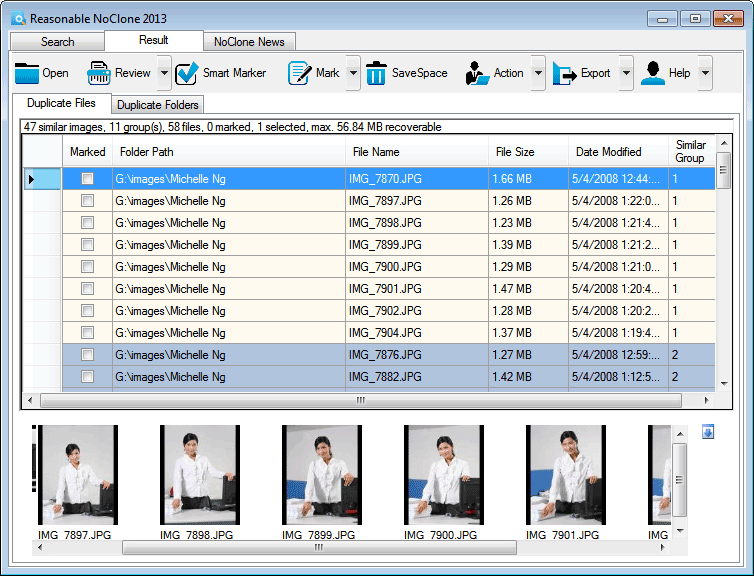
NoClone NoClone - Find and Remove TRUE duplicate files.
Byte-to-byte comparison. Smart deletion. Clean up hard drive. More info - Download - Get it now!
|
|
Featured: AttributeMagic Pro
AttributeMagic Pro Changes file/folder date-time and attributes en masse. You can set/reset attributes, Accessed, Modified, Created dates, JPEG/EXIF metadata, MS Office document properties, NTFS streams. Date-time shifting, masking, assignment, directory printing. More info - Download - Get it now!
|
|
Soft14:
| |  | Power Data Recovery is a risk-free and READ ONLY data recovery utility that helps you recover your data after accidental deletion, accidental format, repartition, virus attack, software malfunction, system crash. See also: data recovery tool, file recovery tool, partition recovery tool, deleted files recovery tool, data recovery software tool, ...
[ Download Power Data Recovery - Get Power Data Recovery now - More info about Power Data Recovery ] |
| |  | Quickly search through large numbers of files on your PC or network using powerful text patterns to find exactly the information you want. Search and replace with plain text or regular expressions to maintain web sites, source code, reports, ... See also: grep tool, egrep tool, regular expressions tool, perl tool, regex tool, regular expression tool, regexes tool, search and replace tool, search tool, ...
[ Download PowerGREP - Get PowerGREP now - More info about PowerGREP ] |
| |  | |
| |  | Rename files, renumber files, and resize files in one easy operation. Integrates with Windows Explorer (Microsoft's file manager). Renumber files by file time, date picture taken, or alphabetical order. Works with all file types. Organize files fast. See also: rename files tool, renumber files tool, resize files tool, rename and renumber files tool, rename pictures tool, renumber pictures tool, resize pictures tool, images tool, digital tool, ...
[ Download PicRenameIt - Get PicRenameIt now - More info about PicRenameIt ] |
| |  | PhotoshRecovery is a powerful data recovery software for damaged Adobe Photoshop image files (.PSD,.PDD). Recovered layers are saved in Windows Bitmap format (.BMP). Original dimensions and color depth are recovered. See also: photoshop recovery tool, psd recovery tool, photoshop corrupted tool, psd corrupted tool, corrupted photoshop tool, corrupted psd tool, psd repair tool, repair photoshop tool, photoshop repair tool, ...
[ Download PhotoshopRecovery - Get PhotoshopRecovery now - More info about PhotoshopRecovery ] |
| |  | Pictures you can't find are JUST AS USELESS as pictures that are completely lost! So, it is important to think about a system for naming pictures and picture folders. Prograce Photo Sorter helps you to organize your photo folders based on EXIF info See also: photo renamer tool, image renamer tool, picture renamer tool, picture organizer tool, photo organizer tool, image organizer tool, image sorter tool, picture sorter tool, photo sorter tool, ...
[ Download Photo Sorter - Get Photo Sorter now - More info about Photo Sorter ] |
|
Suggested software:

EasyWebEditorA professional and easy to use software for creating your own Web site.
|
|
| |  | Windows tool to copy or delete files and folders with filename too long error. Just browse to the file and press a button to copy or detele it, thats it! The application solves the problem with inability to delete files and folders with long paths. See also: can t delete folder tool, path too long tool, delete long path tool, trailing space tool, trailing dot tool, mac files tool, 260 path limit tool, copy file tool, filename too long tool, ...
[ Download Path too long tool - Get Path too long tool now - More info about Path too long tool ] |
| |  | |
See also the other sections: Utilities, Hardware File, Disk Management section 1, Utilities, Hardware File, Disk Management section 2, Utilities, Hardware File, Disk Management section 3, Utilities, Hardware File, Disk Management section 4, Utilities, Hardware File, Disk Management section 5, Utilities, Hardware File, Disk Management section 6, Utilities, Hardware File, Disk Management section 7, Utilities, Hardware File, Disk Management section 8, Utilities, Hardware File, Disk Management section 9, Utilities, Hardware File, Disk Management section 10, Utilities, Hardware File, Disk Management section 11, Utilities, Hardware File, Disk Management section 12, Utilities, Hardware File, Disk Management section 13, Utilities, Hardware File, Disk Management section 14, Utilities, Hardware File, Disk Management section 15, Utilities, Hardware File, Disk Management section 16, Utilities, Hardware File, Disk Management section 17, Utilities, Hardware File, Disk Management section 18, Utilities, Hardware File, Disk Management section 19, Utilities, Hardware File, Disk Management section 20, Utilities, Hardware File, Disk Management section 21, Utilities, Hardware File, Disk Management section 22, Utilities, Hardware File, Disk Management section 23, Utilities, Hardware File, Disk Management section 24, Utilities, Hardware File, Disk Management section 25, Utilities, Hardware File, Disk Management section 26, Utilities, Hardware File, Disk Management section 27, Utilities, Hardware File, Disk Management section 28, Utilities, Hardware File, Disk Management section 29, Utilities, Hardware File, Disk Management section 30, Utilities, Hardware File, Disk Management section 31, Utilities, Hardware File, Disk Management section 32, Utilities, Hardware File, Disk Management section 33, Utilities, Hardware File, Disk Management section 34, Utilities, Hardware File, Disk Management section 35, Utilities, Hardware File, Disk Management section 36, Utilities, Hardware File, Disk Management section 37, Utilities, Hardware File, Disk Management section 38, Utilities, Hardware File, Disk Management section 39, Utilities, Hardware File, Disk Management section 40, Utilities, Hardware File, Disk Management section 41, Utilities, Hardware File, Disk Management section 42, Utilities, Hardware File, Disk Management section 43, Utilities, Hardware File, Disk Management section 44, Utilities, Hardware File, Disk Management section 45, Utilities, Hardware File, Disk Management section 46, Utilities, Hardware File, Disk Management section 47, Utilities, Hardware File, Disk Management section 48, Utilities, Hardware File, Disk Management section 49, Utilities, Hardware File, Disk Management section 50, Utilities, Hardware File, Disk Management section 51, Utilities, Hardware File, Disk Management section 52, Utilities, Hardware File, Disk Management section 53, Utilities, Hardware File, Disk Management section 54, Utilities, Hardware File, Disk Management section 55, Utilities, Hardware File, Disk Management section 56, Utilities, Hardware File, Disk Management section 57, Utilities, Hardware File, Disk Management section 58, Utilities, Hardware File, Disk Management section 59, Utilities, Hardware File, Disk Management section 60, Utilities, Hardware File, Disk Management section 61, Utilities, Hardware File, Disk Management section 62, Utilities, Hardware File, Disk Management section 63, Utilities, Hardware File, Disk Management section 64, Utilities, Hardware File, Disk Management section 65, Utilities, Hardware File, Disk Management section 66, Utilities, Hardware File, Disk Management section 67, Utilities, Hardware File, Disk Management section 68, Utilities, Hardware File, Disk Management section 69
|
|
Categories
|
|
|
|