Software:

Featured: NoClone
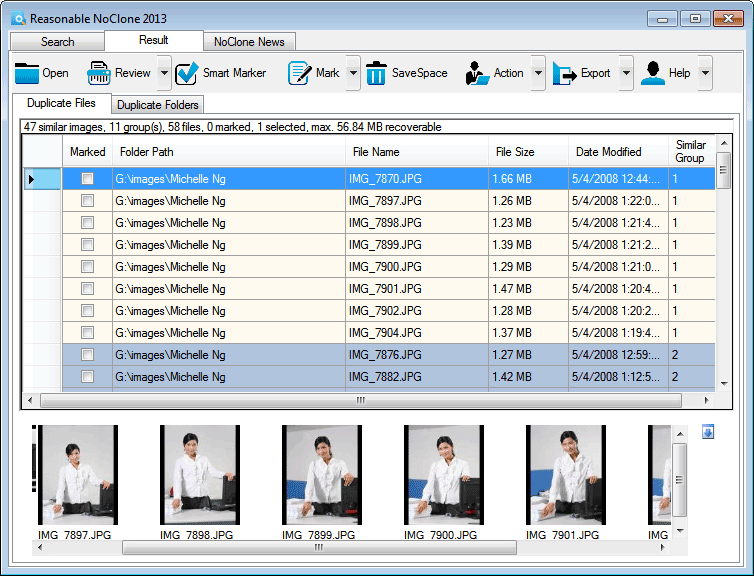
NoClone NoClone - Find and Remove TRUE duplicate files.
Byte-to-byte comparison. Smart deletion. Clean up hard drive. More info - Download - Get it now!
|
|
Featured: AttributeMagic Pro
AttributeMagic Pro Changes file/folder date-time and attributes en masse. You can set/reset attributes, Accessed, Modified, Created dates, JPEG/EXIF metadata, MS Office document properties, NTFS streams. Date-time shifting, masking, assignment, directory printing. More info - Download - Get it now!
|
|
Soft14:
| |  | UltraSentry is a highly advanced military-grade disk and registry cleaner that has on-board, fully configurable security profiles that can run on demand, as scheduled or upon event to ensure your complete computer privacy & security. See also: privacy tool, security tool, disk cleaner tool, registry cleaner tool, scheduled events tool, security profiles tool, configurable tool, browser history tool, swap files tool, ...
[ Download UltraSentry - Get UltraSentry now - More info about UltraSentry ] |
| |  | USB Safely Remove is a USB device manager. It saves time and extends user abilities on active work with flash-drives, portable drives, card readers and other gadgets See also: system tool, utilities tool, USB device tool, USB Flash Drive tool, stop device tool, eject device tool, safely remove hardware tool, shortcuts tool, hotkeys tool, ...
[ Download USB Safely Remove - Get USB Safely Remove now - More info about USB Safely Remove ] |
|
Suggested software:

EasyWebEditorA professional and easy to use software for creating your own Web site.
|
|
| |  | This software allows you to write NTFS files from a Mac computer. By default, Mac operating systems provide read-only access to NTFS partitions. The software has full support for OS X Mavericks. See also: tuxera tool, ntfs tool, mac os tool, macfuse tool, macosx tool, snow leopard tool, ntfs 3g tool, lion tool, mountain lion tool, ...
[ Download Tuxera NTFS for Mac - Get Tuxera NTFS for Mac now - More info about Tuxera NTFS for Mac ] |
| |  | |
| |  | The only copy and paste function available for mac that can be paused and resumed with ease and withour any loss of data, now can easily be done with the help of Turbo Copy Pro tool by Gladwev Software. See also: copy and paste mac files tool, copy mac files tool, paste mac files tool, move mac files tool, copy and paste on mac tool, copy and paste functions on mac tool, quick copy and paste on mac tool, fast copy and past on mac tool, fast copying function mac tool, ...
[ Download Turbo Copy Pro - Get Turbo Copy Pro now - More info about Turbo Copy Pro ] |
See also the other sections: Utilities, Hardware File, Disk Management section 1, Utilities, Hardware File, Disk Management section 2, Utilities, Hardware File, Disk Management section 3, Utilities, Hardware File, Disk Management section 4, Utilities, Hardware File, Disk Management section 5, Utilities, Hardware File, Disk Management section 6, Utilities, Hardware File, Disk Management section 7, Utilities, Hardware File, Disk Management section 8, Utilities, Hardware File, Disk Management section 9, Utilities, Hardware File, Disk Management section 10, Utilities, Hardware File, Disk Management section 11, Utilities, Hardware File, Disk Management section 12, Utilities, Hardware File, Disk Management section 13, Utilities, Hardware File, Disk Management section 14, Utilities, Hardware File, Disk Management section 15, Utilities, Hardware File, Disk Management section 16, Utilities, Hardware File, Disk Management section 17, Utilities, Hardware File, Disk Management section 18, Utilities, Hardware File, Disk Management section 19, Utilities, Hardware File, Disk Management section 20, Utilities, Hardware File, Disk Management section 21, Utilities, Hardware File, Disk Management section 22, Utilities, Hardware File, Disk Management section 23, Utilities, Hardware File, Disk Management section 24, Utilities, Hardware File, Disk Management section 25, Utilities, Hardware File, Disk Management section 26, Utilities, Hardware File, Disk Management section 27, Utilities, Hardware File, Disk Management section 28, Utilities, Hardware File, Disk Management section 29, Utilities, Hardware File, Disk Management section 30, Utilities, Hardware File, Disk Management section 31, Utilities, Hardware File, Disk Management section 32, Utilities, Hardware File, Disk Management section 33, Utilities, Hardware File, Disk Management section 34, Utilities, Hardware File, Disk Management section 35, Utilities, Hardware File, Disk Management section 36, Utilities, Hardware File, Disk Management section 37, Utilities, Hardware File, Disk Management section 38, Utilities, Hardware File, Disk Management section 39, Utilities, Hardware File, Disk Management section 40, Utilities, Hardware File, Disk Management section 41, Utilities, Hardware File, Disk Management section 42, Utilities, Hardware File, Disk Management section 43, Utilities, Hardware File, Disk Management section 44, Utilities, Hardware File, Disk Management section 45, Utilities, Hardware File, Disk Management section 46, Utilities, Hardware File, Disk Management section 47, Utilities, Hardware File, Disk Management section 48, Utilities, Hardware File, Disk Management section 49, Utilities, Hardware File, Disk Management section 50, Utilities, Hardware File, Disk Management section 51, Utilities, Hardware File, Disk Management section 52, Utilities, Hardware File, Disk Management section 53, Utilities, Hardware File, Disk Management section 54, Utilities, Hardware File, Disk Management section 55, Utilities, Hardware File, Disk Management section 56, Utilities, Hardware File, Disk Management section 57, Utilities, Hardware File, Disk Management section 58, Utilities, Hardware File, Disk Management section 59, Utilities, Hardware File, Disk Management section 60, Utilities, Hardware File, Disk Management section 61, Utilities, Hardware File, Disk Management section 62, Utilities, Hardware File, Disk Management section 63, Utilities, Hardware File, Disk Management section 64, Utilities, Hardware File, Disk Management section 65, Utilities, Hardware File, Disk Management section 66, Utilities, Hardware File, Disk Management section 67, Utilities, Hardware File, Disk Management section 68, Utilities, Hardware File, Disk Management section 69
|
|
Categories
|
|
|
|