Software:

Featured: NoClone
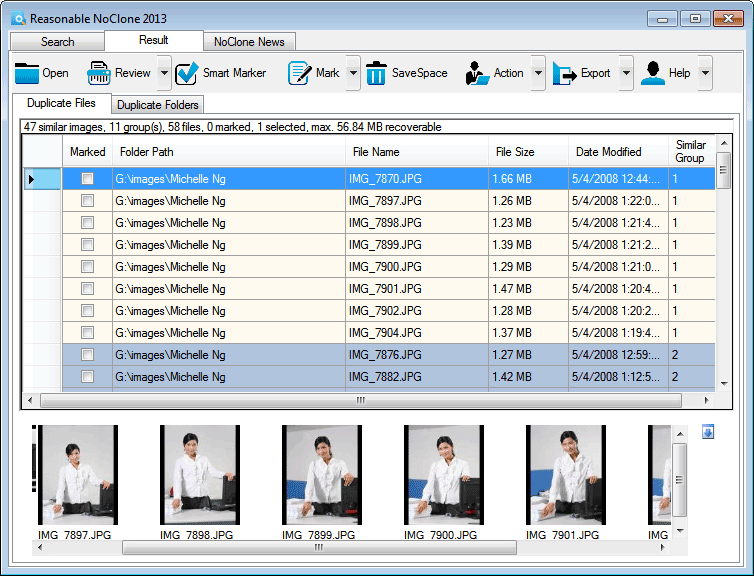
NoClone NoClone - Find and Remove TRUE duplicate files.
Byte-to-byte comparison. Smart deletion. Clean up hard drive. More info - Download - Get it now!
|
|
Featured: AttributeMagic Pro
AttributeMagic Pro Changes file/folder date-time and attributes en masse. You can set/reset attributes, Accessed, Modified, Created dates, JPEG/EXIF metadata, MS Office document properties, NTFS streams. Date-time shifting, masking, assignment, directory printing. More info - Download - Get it now!
|
|
Soft14:
| |  | Chrono Namer is a tool for organize your photos, video clips etc. It rename images to time-formatted name. It also possible append extra text in the end of the filename with a bach operation. Chrono Namer It also has a slideshow function. See also: rename tool, renaming tool, renamer tool, rename file tool, file rename tool, photo rename tool, naming tool, batch tool, change name tool, ...
[ Download Chrono Namer - Get Chrono Namer now - More info about Chrono Namer ] |
| |  | CheckDrive is a free tool allowing you to check your hard disks for errors and to correct them instantly. It's easy to use, fast and reliable. You can use CheckDrive for XP and Vista. See also: CheckDrive tool, check tool, Checkdisk tool, hard disk tool, error tool, drive error tool, SMART data tool, background guard tool, monitoring tool, ...
[ Download CheckDrive - Get CheckDrive now - More info about CheckDrive ] |
| |  | Avail the full benefits offered by Change PDF content solution to copy pdf content, edit pdf content, print pdf content from a protected PDF document in simple steps. See also: change pdf content tool, change content of pdf tool, copy pdf content tool, edit pdf content tool, print pdf content tool, extract pdf content tool, change pdf document tool, pdf security remover tool, ...
[ Download Change PDF Content - Get Change PDF Content now - More info about Change PDF Content ] |
|
Suggested software:

EasyWebEditorA professional and easy to use software for creating your own Web site.
|
|
| |  | CellNet is a multi function program designed to speed up, play and simplify access to the most common files on your computer. See also: File manager tool, music player tool, video player tool, Store URLs tool, Documents tool, programs tool, cloud computing tool, upload tool, download tool, ...
[ Download CellNet - Get CellNet now - More info about CellNet ] |
| |  | |
| |  | |
| |  | |
| |  | |
| |  | |
See also the other sections: Utilities, Hardware File, Disk Management section 1, Utilities, Hardware File, Disk Management section 2, Utilities, Hardware File, Disk Management section 3, Utilities, Hardware File, Disk Management section 4, Utilities, Hardware File, Disk Management section 5, Utilities, Hardware File, Disk Management section 6, Utilities, Hardware File, Disk Management section 7, Utilities, Hardware File, Disk Management section 8, Utilities, Hardware File, Disk Management section 9, Utilities, Hardware File, Disk Management section 10, Utilities, Hardware File, Disk Management section 11, Utilities, Hardware File, Disk Management section 12, Utilities, Hardware File, Disk Management section 13, Utilities, Hardware File, Disk Management section 14, Utilities, Hardware File, Disk Management section 15, Utilities, Hardware File, Disk Management section 16, Utilities, Hardware File, Disk Management section 17, Utilities, Hardware File, Disk Management section 18, Utilities, Hardware File, Disk Management section 19, Utilities, Hardware File, Disk Management section 20, Utilities, Hardware File, Disk Management section 21, Utilities, Hardware File, Disk Management section 22, Utilities, Hardware File, Disk Management section 23, Utilities, Hardware File, Disk Management section 24, Utilities, Hardware File, Disk Management section 25, Utilities, Hardware File, Disk Management section 26, Utilities, Hardware File, Disk Management section 27, Utilities, Hardware File, Disk Management section 28, Utilities, Hardware File, Disk Management section 29, Utilities, Hardware File, Disk Management section 30, Utilities, Hardware File, Disk Management section 31, Utilities, Hardware File, Disk Management section 32, Utilities, Hardware File, Disk Management section 33, Utilities, Hardware File, Disk Management section 34, Utilities, Hardware File, Disk Management section 35, Utilities, Hardware File, Disk Management section 36, Utilities, Hardware File, Disk Management section 37, Utilities, Hardware File, Disk Management section 38, Utilities, Hardware File, Disk Management section 39, Utilities, Hardware File, Disk Management section 40, Utilities, Hardware File, Disk Management section 41, Utilities, Hardware File, Disk Management section 42, Utilities, Hardware File, Disk Management section 43, Utilities, Hardware File, Disk Management section 44, Utilities, Hardware File, Disk Management section 45, Utilities, Hardware File, Disk Management section 46, Utilities, Hardware File, Disk Management section 47, Utilities, Hardware File, Disk Management section 48, Utilities, Hardware File, Disk Management section 49, Utilities, Hardware File, Disk Management section 50, Utilities, Hardware File, Disk Management section 51, Utilities, Hardware File, Disk Management section 52, Utilities, Hardware File, Disk Management section 53, Utilities, Hardware File, Disk Management section 54, Utilities, Hardware File, Disk Management section 55, Utilities, Hardware File, Disk Management section 56, Utilities, Hardware File, Disk Management section 57, Utilities, Hardware File, Disk Management section 58, Utilities, Hardware File, Disk Management section 59, Utilities, Hardware File, Disk Management section 60, Utilities, Hardware File, Disk Management section 61, Utilities, Hardware File, Disk Management section 62, Utilities, Hardware File, Disk Management section 63, Utilities, Hardware File, Disk Management section 64, Utilities, Hardware File, Disk Management section 65, Utilities, Hardware File, Disk Management section 66, Utilities, Hardware File, Disk Management section 67, Utilities, Hardware File, Disk Management section 68, Utilities, Hardware File, Disk Management section 69
|
|
Categories
|
|
|
|