Software:

Featured: NoClone
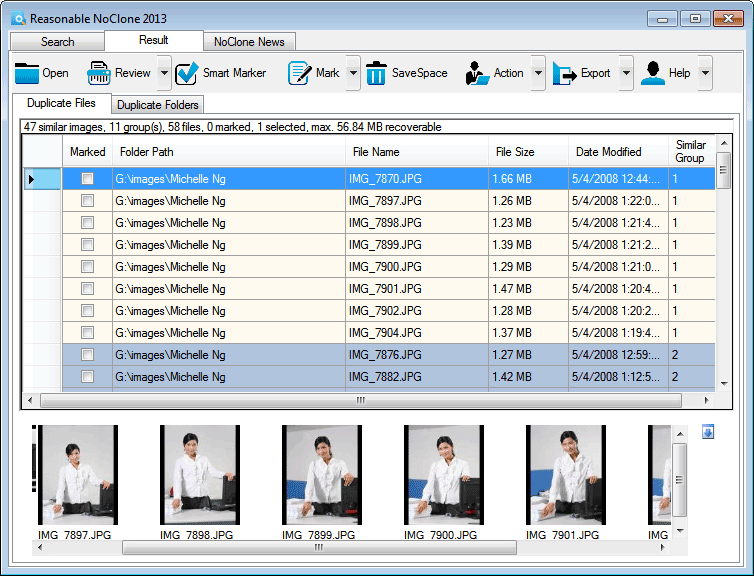
NoClone NoClone - Find and Remove TRUE duplicate files.
Byte-to-byte comparison. Smart deletion. Clean up hard drive. More info - Download - Get it now!
|
|
Featured: AttributeMagic Pro
AttributeMagic Pro Changes file/folder date-time and attributes en masse. You can set/reset attributes, Accessed, Modified, Created dates, JPEG/EXIF metadata, MS Office document properties, NTFS streams. Date-time shifting, masking, assignment, directory printing. More info - Download - Get it now!
|
|
Soft14:
| |  | Formats Customizer helps to configure the opening and saving dialog file types for programs such as Adobe Photoshop, CorelDRAW, and many others. You can specify exactly what types of files and documents to show and hide to speed your workflow. See also: file dialog tool, save dialog tool, open dialog tool, open tool, save tool, export tool, import tool, file types tool, document types tool, ...
[ Download Formats Customizer - Get Formats Customizer now - More info about Formats Customizer ] |
| |  | FolderSizes is a powerful, network-enabled disk space analysis utility which provides users and system administrators alike with deep insights into how their local and network drive space is being consumed. See also: disk tool, space tool, folder tool, sizes tool, free tool, hard tool, drive tool, space tool, usage tool, ...
[ Download FolderSizes - Get FolderSizes now - More info about FolderSizes ] |
|
Suggested software:

EasyWebEditorA professional and easy to use software for creating your own Web site.
|
|
| |  | Recovery any files from hard disk (NTFS, NTFS5, FAT12/FAT16/FAT32, XFS, HFS/HFS+ partitions) and removable media, recovery deleted sms, contacts, calls from Android, Iphone, recovery Skype messages from PC. See also: file recovery tool, data recovery tool, file undelete tool, hard drive recovery tool, hard disk recovery tool, File recover tool, undelete file tool, recover my file tool, file recovery software tool, ...
[ Download FineRecovery - Get FineRecovery now - More info about FineRecovery ] |
| |  | Files splitter software split large file into small chunks which are easy to be sent and stored, while documents joiner add these split parts together so that the original file is restored. Cut big size files to save on different modest storage drive See also: Files tool, Splitter tool, Software tool, Splitting tool, Cutter tool, Program tool, Split tool, Break tool, Divide tool, ...
[ Download Files Splitter Software - Get Files Splitter Software now - More info about Files Splitter Software ] |
| |  | Job Based File Management for Networks and Desktop Computers. Job based search, backup, copy, move, delete, compression, decompression and synchronization of files and folders. See also: Automatically tool, Move tool, Copy tool, Delete tool, Synchronize tool, Compress tool, Decompress tool, File tool, Folder tool, ...
[ Download FilerPal Jobber - Get FilerPal Jobber now - More info about FilerPal Jobber ] |
| |  | With just a few clicks, the metadata extractor Filecats Professional imports the Windows Explorer columns plus document properties from Microsoft Office, picture/photograph, audio/video and MSG files into Excel, with hyperlinks. Free trial. See also: metadata extractor tool, catalog tool, Microsoft Excel tool, Windows Explorer tool, document properties tool, Office tool, emails tool, photo tool, ...
[ Download Filecats Professional - Get Filecats Professional now - More info about Filecats Professional ] |
| |  | With a few clicks, the metadata extractor Filecats Metadata catalogs Windows Explorer data and scores of document properties from Word, Excel, PowerPoint, images/photos, audio/video and MSG (Outlook) files into a table, with hyperlinks. Free trial. See also: metadata extractor tool, catalog tool, Windows Explorer tool, document properties tool, Office tool, emails tool, photo tool, ...
[ Download Filecats Metadata - Get Filecats Metadata now - More info about Filecats Metadata ] |
See also the other sections: Utilities, Hardware File, Disk Management section 1, Utilities, Hardware File, Disk Management section 2, Utilities, Hardware File, Disk Management section 3, Utilities, Hardware File, Disk Management section 4, Utilities, Hardware File, Disk Management section 5, Utilities, Hardware File, Disk Management section 6, Utilities, Hardware File, Disk Management section 7, Utilities, Hardware File, Disk Management section 8, Utilities, Hardware File, Disk Management section 9, Utilities, Hardware File, Disk Management section 10, Utilities, Hardware File, Disk Management section 11, Utilities, Hardware File, Disk Management section 12, Utilities, Hardware File, Disk Management section 13, Utilities, Hardware File, Disk Management section 14, Utilities, Hardware File, Disk Management section 15, Utilities, Hardware File, Disk Management section 16, Utilities, Hardware File, Disk Management section 17, Utilities, Hardware File, Disk Management section 18, Utilities, Hardware File, Disk Management section 19, Utilities, Hardware File, Disk Management section 20, Utilities, Hardware File, Disk Management section 21, Utilities, Hardware File, Disk Management section 22, Utilities, Hardware File, Disk Management section 23, Utilities, Hardware File, Disk Management section 24, Utilities, Hardware File, Disk Management section 25, Utilities, Hardware File, Disk Management section 26, Utilities, Hardware File, Disk Management section 27, Utilities, Hardware File, Disk Management section 28, Utilities, Hardware File, Disk Management section 29, Utilities, Hardware File, Disk Management section 30, Utilities, Hardware File, Disk Management section 31, Utilities, Hardware File, Disk Management section 32, Utilities, Hardware File, Disk Management section 33, Utilities, Hardware File, Disk Management section 34, Utilities, Hardware File, Disk Management section 35, Utilities, Hardware File, Disk Management section 36, Utilities, Hardware File, Disk Management section 37, Utilities, Hardware File, Disk Management section 38, Utilities, Hardware File, Disk Management section 39, Utilities, Hardware File, Disk Management section 40, Utilities, Hardware File, Disk Management section 41, Utilities, Hardware File, Disk Management section 42, Utilities, Hardware File, Disk Management section 43, Utilities, Hardware File, Disk Management section 44, Utilities, Hardware File, Disk Management section 45, Utilities, Hardware File, Disk Management section 46, Utilities, Hardware File, Disk Management section 47, Utilities, Hardware File, Disk Management section 48, Utilities, Hardware File, Disk Management section 49, Utilities, Hardware File, Disk Management section 50, Utilities, Hardware File, Disk Management section 51, Utilities, Hardware File, Disk Management section 52, Utilities, Hardware File, Disk Management section 53, Utilities, Hardware File, Disk Management section 54, Utilities, Hardware File, Disk Management section 55, Utilities, Hardware File, Disk Management section 56, Utilities, Hardware File, Disk Management section 57, Utilities, Hardware File, Disk Management section 58, Utilities, Hardware File, Disk Management section 59, Utilities, Hardware File, Disk Management section 60, Utilities, Hardware File, Disk Management section 61, Utilities, Hardware File, Disk Management section 62, Utilities, Hardware File, Disk Management section 63, Utilities, Hardware File, Disk Management section 64, Utilities, Hardware File, Disk Management section 65, Utilities, Hardware File, Disk Management section 66, Utilities, Hardware File, Disk Management section 67, Utilities, Hardware File, Disk Management section 68, Utilities, Hardware File, Disk Management section 69
|
|
Categories
|
|
|
|