Software:

Featured: NoClone
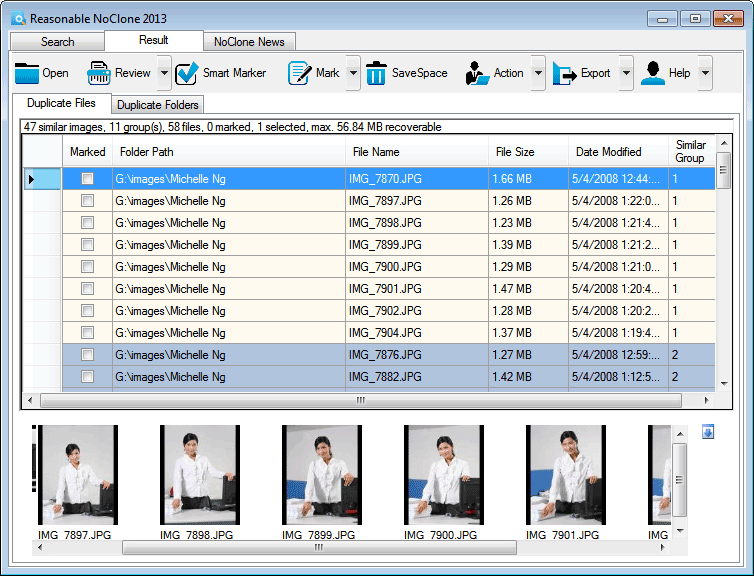
NoClone NoClone - Find and Remove TRUE duplicate files.
Byte-to-byte comparison. Smart deletion. Clean up hard drive. More info - Download - Get it now!
|
|
Featured: AttributeMagic Pro
AttributeMagic Pro Changes file/folder date-time and attributes en masse. You can set/reset attributes, Accessed, Modified, Created dates, JPEG/EXIF metadata, MS Office document properties, NTFS streams. Date-time shifting, masking, assignment, directory printing. More info - Download - Get it now!
|
|
Soft14:
| |  | Visual Similarity Duplicate Image Finder uses advanced algorithms to find similar images in a way that a human does. Due to that fact it can find similar photos even if they are in different image formats, different bit depth and image sizes. See also: duplicate image finder tool, visual tool, similarity tool, duplicate tool, image tool, finder tool, picture tool, photo tool, photograph tool, ...
[ Download Visual Similarity Duplicate Image Finder - Get Visual Similarity Duplicate Image Finder now - More info about Visual Similarity Duplicate Image Finder ] |
| |  | Visual Renamer is unique batch renaming tool. Apart from common features of batch renaming, it can rename karaoke files, supports THM, EXIF, MP3 tags, and has lots of different filters to sort out files. You can also create your own custom scripts. See also: rename files tool, file renamer tool, file rename tool, mp3 rename tool, multiple rename tool, OuickRename tool, multi rename tool, utility tool, software tool, ...
[ Download Visual Renamer - Get Visual Renamer now - More info about Visual Renamer ] |
| |  | Virtual Hard Drive Pro creates a RAM drive, which functions like a physical hard drive, only with much faster access rates. A RAM drive bypasses the system hard drive, which is the slowest part of a computer, to give your system an immediate boost. See also: virtual hard drive tool, RAM disk drive tool, RAM disk tool, RAM drive tool, virtual hard disk tool, performance software tool, virtual disk drive tool, virtual RAM drive tool, ...
[ Download Virtual Hard Drive Pro - Get Virtual Hard Drive Pro now - More info about Virtual Hard Drive Pro ] |
|
Suggested software:

EasyWebEditorA professional and easy to use software for creating your own Web site.
|
|
| |  | File browser with utilities: Replacer, Renamer, Finder, Batch Replacer, Case converter, Change attributes, Batch Replacer for MS Word, Batch Replacer for MS Excel, Batch Replacer for MS PowerPoint. Add new additional utilities too! See also: Batch Replace tool, Search files by text tool, Change date tool, Rename multiply files tool, OEM to Ansi tool, Change Attributes tool, Set TIME in files tool, ANSI to OEM tool, ReplSoft tool, ...
[ Download Useful File Utilities - Get Useful File Utilities now - More info about Useful File Utilities ] |
| |  | Update file modification dates by days, hours, minutes, or seconds. Specify a single file or all files in a folder. Useful for synchronizing the date and time stamps of pictures taken with multiple cameras. Increase or decrease file times. Free. See also: updatedates tool, modification date tool, update modification dates tool, change tool, update timestamp tool, change dates tool, time tool, free tool, date tool, ...
[ Download UpdateDates - Get UpdateDates now - More info about UpdateDates ] |
| |  | |
| |  | Accidentally deleted your files and folders? Undelete NOW! recovers your lost files, no matter how they were erased. Using powerful bit-by-bit scanning methods, you can be sure to get your files back quickly and easily. See also: undelete tool, recover tool, recover data tool, recover lost data tool, undo delete tool, unerase tool, recover files tool, recover file tool, file recovery tool, ...
[ Download Undelete NOW! - Get Undelete NOW! now - More info about Undelete NOW! ] |
See also the other sections: Utilities, Hardware File, Disk Management section 1, Utilities, Hardware File, Disk Management section 2, Utilities, Hardware File, Disk Management section 3, Utilities, Hardware File, Disk Management section 4, Utilities, Hardware File, Disk Management section 5, Utilities, Hardware File, Disk Management section 6, Utilities, Hardware File, Disk Management section 7, Utilities, Hardware File, Disk Management section 8, Utilities, Hardware File, Disk Management section 9, Utilities, Hardware File, Disk Management section 10, Utilities, Hardware File, Disk Management section 11, Utilities, Hardware File, Disk Management section 12, Utilities, Hardware File, Disk Management section 13, Utilities, Hardware File, Disk Management section 14, Utilities, Hardware File, Disk Management section 15, Utilities, Hardware File, Disk Management section 16, Utilities, Hardware File, Disk Management section 17, Utilities, Hardware File, Disk Management section 18, Utilities, Hardware File, Disk Management section 19, Utilities, Hardware File, Disk Management section 20, Utilities, Hardware File, Disk Management section 21, Utilities, Hardware File, Disk Management section 22, Utilities, Hardware File, Disk Management section 23, Utilities, Hardware File, Disk Management section 24, Utilities, Hardware File, Disk Management section 25, Utilities, Hardware File, Disk Management section 26, Utilities, Hardware File, Disk Management section 27, Utilities, Hardware File, Disk Management section 28, Utilities, Hardware File, Disk Management section 29, Utilities, Hardware File, Disk Management section 30, Utilities, Hardware File, Disk Management section 31, Utilities, Hardware File, Disk Management section 32, Utilities, Hardware File, Disk Management section 33, Utilities, Hardware File, Disk Management section 34, Utilities, Hardware File, Disk Management section 35, Utilities, Hardware File, Disk Management section 36, Utilities, Hardware File, Disk Management section 37, Utilities, Hardware File, Disk Management section 38, Utilities, Hardware File, Disk Management section 39, Utilities, Hardware File, Disk Management section 40, Utilities, Hardware File, Disk Management section 41, Utilities, Hardware File, Disk Management section 42, Utilities, Hardware File, Disk Management section 43, Utilities, Hardware File, Disk Management section 44, Utilities, Hardware File, Disk Management section 45, Utilities, Hardware File, Disk Management section 46, Utilities, Hardware File, Disk Management section 47, Utilities, Hardware File, Disk Management section 48, Utilities, Hardware File, Disk Management section 49, Utilities, Hardware File, Disk Management section 50, Utilities, Hardware File, Disk Management section 51, Utilities, Hardware File, Disk Management section 52, Utilities, Hardware File, Disk Management section 53, Utilities, Hardware File, Disk Management section 54, Utilities, Hardware File, Disk Management section 55, Utilities, Hardware File, Disk Management section 56, Utilities, Hardware File, Disk Management section 57, Utilities, Hardware File, Disk Management section 58, Utilities, Hardware File, Disk Management section 59, Utilities, Hardware File, Disk Management section 60, Utilities, Hardware File, Disk Management section 61, Utilities, Hardware File, Disk Management section 62, Utilities, Hardware File, Disk Management section 63, Utilities, Hardware File, Disk Management section 64, Utilities, Hardware File, Disk Management section 65, Utilities, Hardware File, Disk Management section 66, Utilities, Hardware File, Disk Management section 67, Utilities, Hardware File, Disk Management section 68, Utilities, Hardware File, Disk Management section 69
|
|
Categories
|
|
|
|