O in short: Files - is a Windows Utility that you can use to delete files and folders that you are not able to delete using the standard Windows Delete function. New version includes a function to Scangood
|
 Categories Categories |
|
|
|
|
|
DelinvFile 5.01 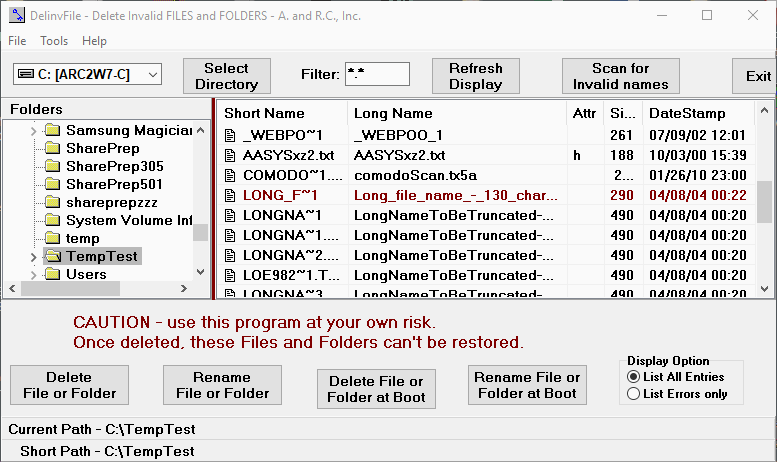
Click to enlargeDescription:Delete invalid Files - DelinvFile - is a Windows Utility that you can use to delete data files and folders that you are not able to delete using the standard Windows Delete function. DelinvFile provides a convenient User Interface for selecting the file or folder that you need to delete and provides for a choice of two delete methods. You use the standard controls for Drives, Folders, and Files to navigate to the Folder or file to be deleted. Note that Filenames are displayed in both forms - Short FileName and Long Filename as a convenience for the user. Once an item has been highlighted and selected, you can click the Delete buttons to try to delete it. Note that you may be able to delete with one method but not the other. Try both if necessary. If neither of the delete operations succeed, you have a more involved problem than DelinvFile was designed to handle. Recent versions include new options. These include Rename File, Rename Folder, "Delete File at Boot", "Delete Folder at Boot" and an 'Open With.." function for allowing you to open your choice of program to view a selected file. Now includes a function to Scan for Invalid and Too-Long Names.
 | Price $ 31.95 /

Purchase DelinvFile
Get it Now(to see additional options, click Buy Now) Type: Shareware File size: 1319 Kb Date: 09/27/2014 HomepageInstall support: Install and Uninstall OS: Win7 x32, Win7 x64, Windows 8, WinServer, WinVista, WinVista x64 System requirements: Windows VISTA / Win-7 / Win-8 Language: English Recent changes in this Major Update:Implemented UNICODE support, multi-select, bulk delete, improved error diagnostics, improved processing speed for deleting multi-level folders | |
|




